
Gexa Energy
Gexa Energy LPHouse & Home
3.1435.00 Reviews
- Version
- 3.0.15
- Installs
- 100.00K
- Age Rating
- Everyone
Screenshots
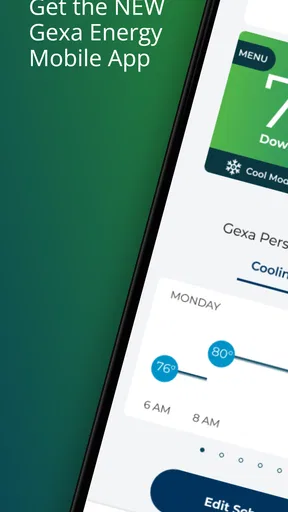
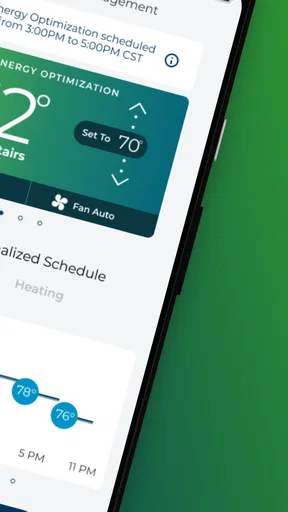
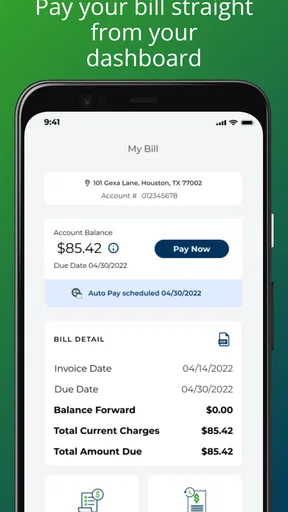
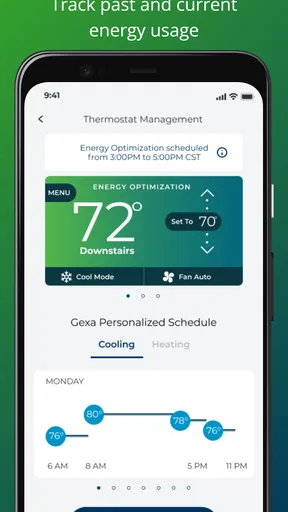
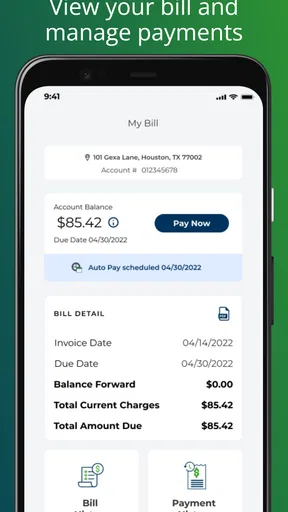
Our Review of Gexa Energy
 Analysis by Appyee
Managing a home energy account is rarely difficult because of one complicated task. The real challenge is keeping several small tasks under control: checking what you owe, watching usage, spotting a change in your routine, and deciding whether an adjustment is worth making. I spent time with Gexa Energy to see whether it makes those jobs easier than using a browser or relying on paper statements. My impression is that it works best as a practical account companion rather than as a complete home-energy coach.
Developed by Gexa Energy LP, this free House & Home app is aimed at customers who want their energy information close at hand. It is available for Everyone, supports devices running Android 5.0 or later, and has reached over 100 thousand installs. The current version is 3.0.15, while its average score sits at 3.1 from around 3 thousand ratings and 435 written reviews. Those figures suggest a useful but uneven experience: plenty of people use it successfully, yet it is not the kind of app I would recommend without explaining where it fits and where its boundaries are.
Starting with a simple account routine
My preferred way to use the app is to make it part of a repeatable routine instead of opening it only when a bill feels unexpectedly high. After signing in, I would first review the account overview, then check the available usage information, and finally look at anything that needs attention. That order matters because it separates immediate account administration from longer-term energy habits.
The first benefit is convenience. A mobile account view is easier to consult while standing in the kitchen, planning a weekend away, or discussing household expenses than a desktop page. I can check the account when the question comes up rather than postponing it until I remember to open a browser. For a household where one person handles the utility account but others make daily decisions about heating, cooling, or appliances, that quick access can make the information more useful.
I would not treat the opening screen as a complete explanation of a bill, though. A summary is good for orientation, but an unusual amount deserves a closer look at the detailed account and usage information. My practical habit is to compare the current view with previous periods and with what was happening at home. A change after guests arrive, a long hot spell, or a different thermostat schedule can be more revealing than a single total.
This is also where the app’s category becomes clear. It is not a general smart-home controller, and I would not expect it to operate every appliance in the house. Its value is tied to the Gexa account: viewing energy-related information, handling account tasks, and helping me make decisions with the information the provider presents. If you want a single dashboard for lights, plugs, thermostats, solar equipment, and utility billing, a dedicated smart-home platform may be a better match.
What I would check before changing my habits
When usage looks higher than expected, I would avoid immediately blaming one appliance. I would first check whether the billing period is comparable, whether the household schedule changed, and whether the weather made heating or cooling work harder. The app can provide a useful starting point for that investigation, but the interpretation still depends on what happened in the home.
A realistic example is a family returning from a trip. The next account check shows a different pattern from the weeks when the house was empty. Instead of guessing, I would use the app to review the account and available usage details, then write down the likely causes: a thermostat left at a normal setting, extra laundry after returning, or more time spent at home. The useful outcome is not merely seeing a number; it is building a connection between household behavior and the account history.
Another sensible routine is checking before making a larger household decision. If I am considering longer air-conditioning hours, a new appliance, or a change in occupancy, I would look at recent usage first and then revisit it after the change has settled. That creates a basic before-and-after comparison without needing a separate spreadsheet. The app is most helpful when I give each check a purpose.
Settings and account details worth reviewing
I would begin by checking the account and notification-related areas rather than assuming the default arrangement is ideal. Confirming that the correct account is selected, that contact details are current, and that alerts are configured in a useful way can prevent the app from becoming a passive place I visit only after a problem appears.
Notifications deserve a careful balance. Too few reminders mean I may miss something important; too many make every alert feel disposable. I prefer enabling only the notices that support a real action, such as checking an account item or reviewing a change. If the app offers several notification choices on a particular device, I would test them for a week and keep only those that genuinely improve my routine.
I would also review the phone’s own permissions and battery behavior if the app seems slow to update or if alerts do not arrive reliably. That is not a special Gexa feature; it is a practical troubleshooting step for any account app. Android settings can silence notifications, restrict background activity, or block mobile data. Checking those system controls before reinstalling the app can save time.
Privacy is another reason to use deliberate settings. A utility account contains information I would rather not expose casually, especially on a shared phone. I would use the device’s screen lock, avoid leaving the account open in public, and sign out when using someone else’s device. These habits are more important than searching for a large collection of customization options that may not be relevant to everyday account management.
One limitation I noticed in the overall concept is that provider apps are naturally dependent on account data and service systems outside the phone. If information appears delayed or a page fails to load, changing a visual setting will not necessarily solve it. I would first retry on a stable connection, check whether other account areas work, and then use Gexa’s normal support route if the problem continues. The app is a convenient access point, not an independent record of the home’s energy system.
Faster patterns for everyday use
The quickest workflow is not opening the app repeatedly throughout the day. It is deciding what I need before I open it. For a routine bill check, I would go straight to the account view, confirm the important detail, and close the app. For an energy review, I would allow more time and compare the usage view with what changed at home. This small distinction prevents a quick check from turning into unfocused scrolling.
I also find it useful to keep a short note outside the app when investigating an unusual period. I might record the date range, a major schedule change, and one or two likely causes. That gives the next review some context and reduces the temptation to react emotionally to a single high or low reading. The app supplies the account view; the note supplies the household memory.
For shared homes, a simple division of responsibility works better than everyone checking randomly. One person can handle account administration while another reports practical changes, such as a broken air conditioner or a room being used more often. The app then becomes a common reference point instead of a private screen that only one household member understands.
There is also a useful travel habit. Before leaving, I would check the account and note the household’s normal status. After returning, I would review what changed during the absence rather than assuming the bill should be identical to the previous one. This is especially helpful when someone forgot to adjust the thermostat or when the home was occupied unexpectedly. The comparison is simple, but it turns the app into part of a repeatable travel checklist.
For people who prefer shortcuts, the best shortcut is usually a device-level one: keep the app easy to find, use the phone’s notification controls intelligently, and avoid storing sensitive sign-in details on a shared device. I would not promise that a shortcut can replace a full account review. Faster access is valuable only when it leads to the right information, not when it encourages me to rely on a partial glance.
Where the app helps, and where it stops
The strongest use case is a Gexa customer who wants a convenient mobile route to account and energy information. It is particularly suitable for someone who checks household expenses from a phone, wants to notice changes sooner, or prefers a provider-specific app over a browser bookmark. The free price also removes a common barrier to trying it.
I would be more cautious recommending it to someone who expects detailed automation or appliance-level analysis. The app’s purpose is connected to managing and optimizing home energy usage, but that does not make it a replacement for a smart thermostat, a plug-level monitor, or an energy-monitoring system designed to identify individual devices. Those tools may offer more granular control, while this app remains the more direct option for the Gexa account itself.
That distinction matters when choosing between alternatives. A browser can sometimes provide a broader account layout and may be preferable when I need to read several details at once. A phone app is better for quick checks and routine access. A spreadsheet is better for long-term personal comparisons, especially if I want to combine energy information with weather, occupancy, or appliance changes. A smart-home platform is better for controlling connected equipment. I see Gexa Energy as the convenient middle layer between a utility website and those more specialized tools.
The average rating of 3.1 is worth considering without treating it as a final verdict. It tells me to expect some friction, whether from individual device behavior, account access, or the limits of a provider-connected experience. I would install it if I were a Gexa customer, but I would keep a browser route available for situations where the mobile layout is not enough. That is a practical backup, not a criticism of using the app.
Older phones may also deserve extra patience. Android support beginning with version 5.0 makes the app broadly accessible, but compatibility alone does not guarantee the same speed or smoothness on every device. If the phone is old, I would keep its operating system updated where possible, close unnecessary background apps, and judge the experience after completing a real account task rather than after a quick launch.
Using the app with better energy decisions
The app cannot decide whether a household change is worthwhile by itself. I would use it to establish a baseline, make one practical adjustment, and then review the result later. Changing several things at once makes it harder to understand what helped. For example, adjusting the thermostat, replacing several appliances, and changing laundry times in the same period may reduce usage, but the app view will not tell me which action mattered most.
A better experiment is modest and repeatable. I might keep the household schedule steady, make one comfort-related adjustment, and compare the next meaningful usage period with a similar one. The comparison will not be perfect because weather and occupancy vary, but it is still more useful than relying on memory. This is one of the app’s less obvious strengths: it can support disciplined habits when I use it as a record to revisit rather than as a source of instant conclusions.
I would also avoid treating a lower reading as automatic proof that every decision was good. Comfort, appliance wear, and household needs matter too. A setting that saves energy but makes the home unpleasant is unlikely to last. The best use of the app is helping me find changes I can repeat, not pushing me toward extreme behavior based on one result.
Another boundary is timing. Account information may reflect a completed period or an available update rather than a live measurement of every appliance. For that reason, I would not use it to diagnose an immediate electrical problem or to confirm that a device is drawing power at this exact moment. If I suspect a safety issue, a faulty appliance, or an urgent service problem, I would use the appropriate professional or provider support channel instead of relying on an app screen.
That limitation does not make the app unhelpful. It simply defines the right question. “How is my account doing, and what pattern should I investigate?” is a good question for Gexa Energy. “Which appliance is consuming power right now?” is better answered by dedicated monitoring equipment. Matching the question to the tool is the difference between a useful review and unrealistic expectations.
My verdict after building a repeatable routine
After using it as an account companion, I see Gexa Energy as a sensible download for existing Gexa customers who want quick mobile access and a practical way to keep energy information in their regular household routine. I like the idea of checking the account before reacting, recording likely causes of changes, and returning after a deliberate adjustment. Those habits give the app more value than simply opening it when a bill is surprising.
My reservations are just as clear. The experience is tied to the provider account, so it is not the right tool for broad smart-home control or detailed appliance diagnostics. The middling 3.1 average also means I would approach it with realistic expectations and keep the browser option available. If I needed advanced automation, highly granular monitoring, or a unified dashboard across several energy services, I would choose a specialized alternative instead.
For the right user, the free app earns its place through convenience rather than spectacle. I would recommend it to a Gexa customer who wants to check account information from a phone, notice changes in household usage, and build a simple review habit. I would skip it as a primary energy tool if my goal were controlling devices or measuring every circuit. The best results come from using it as a repeatable decision aid, not as a complete energy-management system.
Verdict
Strengths of Gexa Energy
- Easy access to account balances, bills, and payment history
- Usage tools help customers monitor electricity consumption
- Autopay and paperless billing simplify recurring account management
- Outage reporting and service updates are available in one place
- Useful for managing multiple Gexa Energy service accounts
Limitations of Gexa Energy
- Features are mainly useful only for existing Gexa Energy customers
- Some users report occasional login or loading problems
- Bill details may take time to appear after recent account activity
- Support options may feel limited compared with calling customer service
- App usefulness depends on Gexa Energy service availability in your area
Similar Picks in This Category
View All
Universal TV Remote Control
CodeMatics Media Solutions3.9

AlfredCamera Home Security app
Alfred Systems Inc.4.7

Planner 5D: AI Home Design
Planner 5D4.5

Universal Tv Remote-Cast to TV
One Music Player4.1

Zillow: Homes for Sale & Rent
Zillow Group4.8

99acres Buy/Rent/Sell Property
infoedge.com4.3
Frequently Asked Questions
What is Gexa Energy, and what can I use the app for?
Gexa Energy is an electricity provider app designed to help eligible customers manage their residential energy account from a mobile device. After signing in, users can typically review their current plan and balance, monitor energy usage, view bills, make payments, enroll in paperless billing, and access account support. Available features may vary depending on your location, plan, and account status.
Can I pay my Gexa Energy bill through the app?
Yes, the Gexa Energy app generally allows customers to make payments directly from their mobile device. Depending on the available options, you may be able to use a bank account or debit or credit card, schedule a payment, and review previous transactions. Before confirming, carefully check the payment amount, processing date, and any applicable convenience fees or restrictions.
Does the Gexa Energy app show my electricity usage?
The app may provide access to electricity consumption information, helping you understand how much energy your household uses over selected periods. Some accounts may include charts, billing comparisons, or usage alerts, while others may offer more limited details. Usage data can be delayed, estimated, or dependent on your utility meter and the services included in your electricity plan.
Do I need to be a Gexa Energy customer to use the app?
Most account-management features require an active Gexa Energy account and valid login credentials. The app is primarily intended for customers who want to manage billing, payments, plans, and service information in one place. If you are considering becoming a customer, you may need to sign up through Gexa Energy’s website or check whether service is available at your address before downloading.
Is the Gexa Energy app free and safe to download?
The Gexa Energy app is generally free to download, although normal mobile data charges may apply when using it without Wi-Fi. For safety, download it only from the official Google Play Store or Apple App Store, verify that the publisher is Gexa Energy, and keep the app updated. Never share your password or payment details through unofficial links or messages.
